Notifications
Apprise is used for all notification functionality by the server. Additional service-specific notification functionality will not be built into Audiobookshelf.
You will need to have an instance of the Apprise API running, or another API endpoint that can handle the same requests.
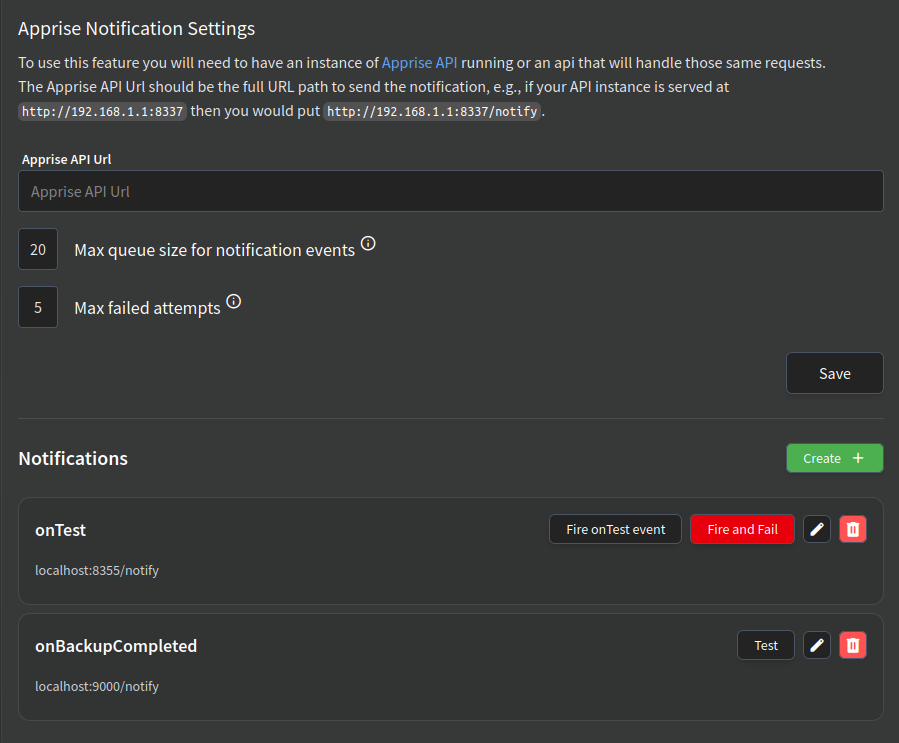
Apprise Configuration
Enter the full URL path to your Apprise API instance for Audiobookshelf to send notifications to.
To prevent notification spam, Audiobookshelf will only send 1 notification per second. If the notificaiton queue is full, new notifications are dropped. Individual notifications will be disabled if the notification fails to send the configured number of times in a row.
Notifications
Here you can define specific notification events and the endpoints they should be sent to. Each entry consists of:
- Notification Event - The trigger that will cause this notification (e.g.,
onTest,onBackupCompleted). - Apprise URL - The destination for the notification, typically your Apprise API endpoint (e.g.,
http://localhost:9000/notify) or your webhook. This allows different endpoints to receive different notification types. - Title Template - The title of the notification, using template substitution.
- Body Template - The body of the notification, using template substitution.
The title and body field support custom messages using variable substitution. The list of variables for the notification type is shown at the bottom of the pop-up and can be used by surrounding the variable name in two sets of braces like {{variable}}.